Know what cash is left.
See money received, payments made and the closing balance in one monthly view.

Cash Tracker
Explore this dashboardREPORTING AND AUTOMATION
Clearer numbers. Fewer manual steps. Practical reports and automations built around your data and the way you work.
REPORTS YOU CAN EXPLORE
Each example uses fictional data. Open the dashboard, then explore the detail.
See money received, payments made and the closing balance in one monthly view.
Cash Tracker
Explore this dashboardCompare invoiced sales with direct costs to understand gross profit and margin.

Sales Report
Explore this dashboardReview expected project costs and forecast profit, so you know where to investigate.
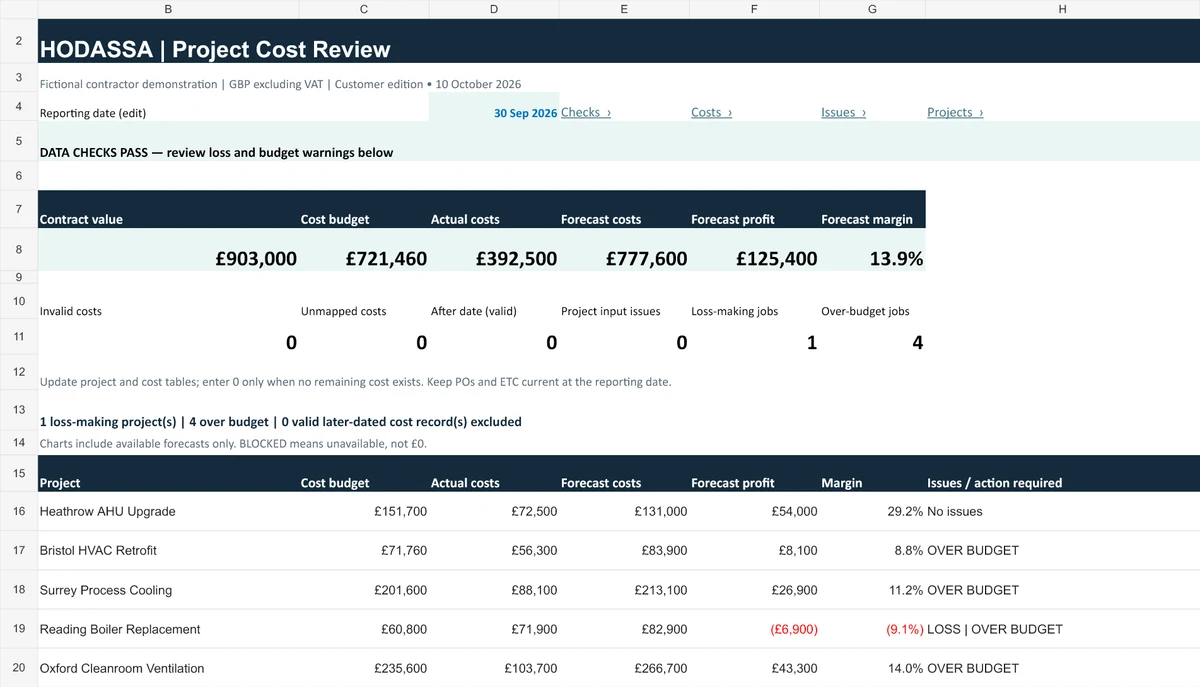
Project Cost Review
Explore this dashboardFile consolidation, recurring reports and information shared between tools. We assess access, sample data and compatibility before agreeing an automation.
Need a new or improved website too?01 / CHECK THE FIT
Review an anonymised sample, the report you need and your Excel version before committing to a build.
02 / AGREE THE SCOPE
Agree inputs, outputs, price, delivery date, revisions and acceptance checks in writing.
03 / BUILD & CHECK
Walk through normal updates, missing data and known totals together. Resolve differences before handover.
04 / HAND OVER
Provide the workbook and instructions. Agree the correction period and any future changes separately.
Imports, integrations, tax calculations, multi-user workflows and larger systems need separate feasibility checks and scope. They are not included in these demonstrations.
START WITH ONE REPORT
Describe the inputs you have, the decision you need to make and your Excel version.
Discuss your projectBEFORE WE START
Explore typical projects, what affects the price and how we agree the work.
Project scope and pricing